Friday, April 25, 2014

Ingredients
cashew nut - 100 gms
melon seeds - 100 gms
Soak together in warm water for 30 minutes and make fine paste.
Finely chopped onions - 1 kg
Oil - 1/2 cup
Ginger garlic paste –4 tbsp
Tomato paste - 1/2 kg ( blanch the tomato ,remove the skin and mark it into paste. )
cardamom - 5
cloves - 5
cinnamon - 1 inch
Chilli powder - 2 tbsp
Coriander powder - 1 tbsp
Cumin powder - 1 tsp
Turmeric powder - 1/2 tsp
Dry fenugreek or kasuri methi - 1 tsp
Cardamon powder - 1/2 tsp
Red colour - 1/4 tsp
Method
In a non stick pan add oil, add cardamom, cloves & cinnamon sauté for a minute add chopped onions , sauté till golden brown.
Add ginger garlic paste , sauté till the raw smell goes then add tomato paste , cook in slow flame and keep stirring to avoid burning, (this step is very important).
Add cashew & melon paste, and add chili powder, coriander powder , turmeric powder ,cumin powder ,cardamom powder and dry fenugreek and red colour and cook for another few minutes and the base gravy is ready .
cool the gravy and can be stored in boxes.
Given below are the gravy options that you can make with this mother gravyVegetarians – You can substitute chicken with paneer or cauliflower or mixed vegetables.
1) Butter Chicken
In a pan, add (oil 2-3 tbsp), add 1 -2 cups base mother gravy, sauté add cooked chicken pieces ( grilled with butter chicken masala or red chilli pwd, haldi, garam masala), sauté chicken pieces well in the base mother gravy, add 2-3 tbsp of tomato ketchup, 1/2 tsp kasoori methi powder, 1 tbsp butter chicken masala, 1 tsp garam masala, salt to taste and 1/4 cup cream simmer for 5 mins and serve
2) Hyderabadi Chicken In a pan, add (oil 2-3 tbsp), add mix of (dried chillies whole, saunf, zeera, mustard seeds), chopped garlic 2 tsp, fry well add 1 -2 cups base mother gravy, sauté add cooked chicken pieces ( grilled with butter chicken masala or red chilli pwd, haldi, garam masala), sauté chicken pieces well in the base mother gravy, add 2-3 tbsp of tomato ketchup, pepper powder, zeera powder, salt to taste, little ghee and sauté well on high flame for 2-3 mins and serve
3) Chicken Tikka Masala In a pan, add (oil 2-3 tbsp), chopped garlic 2 tsp, 2-3 tbsp of tomato ketchup, elaichi powder abt ½ tsp, add 1 -2 cups base mother gravy, sauté add cooked chicken pieces ( grilled with any tandoori tikka masala or red chilli pwd, haldi, garam masala), sauté chicken pieces well in the base gravy, add 2-3 tbsp of grated boiled egg, 1 tsp rose water, salt to taste and serve
Other Variations – Chicken masala – Add chopped capsicum is added in chicken tikka masala along with little tandoori masala.
Dopiaza gravy – Same process as hyderabadi gravy but sauté 1 cup sliced onions are added in the end along with green chillies.
Dhabba Style - Give a tempering with zeera and red chillies, with alot of emphasis of frying/sautéing the masala, addition of grated paneer and dhabba masala, and top with butter before serving.
Achari Chicken – same process as dhabba style add 2 tsp achari masala

Thursday, April 24, 2014

2 min chocolate microwave cake

Ingredients:
2 tbsp. Maida
2 tbsp. Cocoa Powder
1/4 tsp Vanilla essence
3 tbsp. Powdered Sugar
2 tbsp. Milk
2 tbsp. Butter (melted)
2 tbsp. Choco chips (optional)
1 pinch Salt

Method
In a bowl, mix maida, cocoa powder and chocochips.
Melt the butter, add milk and powdered sugar. Mix well. Add the vanilla essence.
Then add maida, cocoa powder, choco chips and salt mixture.
Fold them gently till its mixed.
Pour it into a microwave safe cup and place it in the microwave for 1 minute.(Remember its a microwave cake..not convection mode)
After 1 minute, test with a toothpick whether the cake is done or not. If not, keep again for 20 seconds.
Take off from the microwave.
Once warm, serve it in the same bowl with a scoop of ice cream and drizzle of chocolate sauce.

Wednesday, September 18, 2013

Fundamentals of Testing

Error - It is the mistake done by the human being
Defect - If the human being performs an error, then a defect is produced in his code/document
Failure - A defect in a system would cause the system to fail / not function accordingly. This leads to a failure of the system. Some defects may not lead to failure. The reasons for failure may not only be a defect. It can be an environmental issues also (such as server problems, magnetism etc)

Testing is essential because:
- Its a measure of quality of software (in terms of defects found)
- To meet Legal/Industry specific standards
- To reduce the overall risk of the product
- Gives confidence in the quality of the software (by finding less or no defects)
- Helps in finding the Root Causes of defects , hence will help in developing preventive measures, processes for improvement.
- To decide whether the development would go to the next phase - Provide information for Decision making
- Maintanence/Regression testing is essential to make sure that no new defects are introduced into the system.

Testing includes the following processes:
- Planning and Control
- Choosing test conditions
- Designing and Executing test cases
- Checking results
- Reporting the Test
- Evaluating Exit Criteria

How to prevent defects?
- Sharing the Early Test design with development
- With Root cause analysis done on the previous development cycles

Testing Levels:
1. Component / Unit Testing
2. Integration Testing
3. System Testing
4. Acceptance Testing

Testing Types:
1. Functional Testing - includes Security testing and Interoperability Testing
2. Non Functional Testing - ex: Performance, Load, Stress, Usability, Maintainability, Reliability and Portability - (basically, non functional testing is "how" the system works)
3. Structural / Architectural Testing - includes white box testing
4. Retesting ,  Regression Testing


Static Testing:
  • Uses manual examinations (reviews) to find defects well before the execution of the code. 
  • Any software work can be reviewed, ex: Requirement Specifications, Design Specifications, Code, Test plan, Test cases, Test scripts, user guides or web pages.
  • Typical defects found during reviews: deviations from standards, requirement defects, design defects, insufficient specifications
  • Reviews will catch hold the reasons for defects(which would be found during dynamic testing) rather than defects itself.

Types of Reviews:
 
1. Informal Review - no process followed
2. Walkthrough - The reviewer presents his piece of work to the other members. This is meant for knowledge sharing, but defect discussion is also welcome.
3. Technical  Review - The formal review of presenting the piece of work to the team in technical terms. Meant for making decisions, evaluating alternatives, finding defects, solving technical problems, confirming to rules, procedures, plans, regualations.
4. Inspection - the most formal review with a view of finding defects. Follows various checklists and rules, an inspection report is sent at the end, has a definite entry/exit criteria.

Test Design Techniques:

Black Box technique/ specification based technique - without knowing the code, based on test basis documentation, does not use any information regarding the internal structure of the component which is being tested
  • Equivalence Partitioning - Dividing the inputs to the software system into groups that are expected to exhibit similar behavior.  - including both valid and invalid data
  • Boundary Value Analysis - Testing at the boundaries of each equivalence partition
  • Decision table testing - Based on business logics/rules out of which a simple decision table (cause-effect table) is made. Example of a decision table is as follows:
Conditions                        Rule 1                 Rule 2               Rule 3                  Rule 4
Repayment amount has        T                          T                        F                           F
been entered:
Term of loan has been          T                          F                        T                          F
entered:   

Actions/Outcomes
Process loan amount:          Y                          Y                       N                         N
Process term:                     Y                          N                       Y                         N 
  • State Transition Testing - Testing the software in terms of its various states, transitions between states, the inputs/events that trigger state changes and the actions which may result from those transitions. Assumption - system goes through finite number of states
The system behaves differently even if same input is given, but the previous output would matter in deciding its output.
Example below shows that even the pin entered is incorrect, it would accept again for the first 2 times but the third time, it would block the card. Hence, the previous output/state of the system is considered here.
State transition example

  • Use Case Testing: Tests are derived from use cases (interactions between actors). Useful for designing Acceptance level test cases.
White box test design technique/ Structure based technique - based on the analysis of the structure of the component/system

It has 3 levels:
1. Component level - structure of a software component (statements, decisions, branches, distinct paths)
2. Integration level - call tree diagram (in which modules call other modules)
3. System level - menu structure/business process or web page structure

Statement coverage: The statement coverage is also known as line coverage or segment coverage. It  covers only the true conditions. In this process each and every line of code needs to be checked and executed.
 Consider code sample

READ X
READ Y
I F X>Y THEN Z = 0
ENDIF
To achieve 100% statement coverage of this code segment just one test case is required, one which ensures that variable A contains a value that is greater than the value of variable Y, for example, X = 12 and Y = 10. Note that here we are doing structural test design first, since we are choosing our input values in order ensure statement coverage.

statement coverage formula


Decision coverage: Decision coverage also known as branch coverage or all-edges coverage. It covers both the true and false conditions unlikely the statement coverage.
 100% decision coverage guarantees 100% statement coverage, but not the other way around.
 Consider the code:
1 READ A
2 READ B
3 C = A – 2 *B
4 IFC <0THEN
5 PRINT “C negative”
6 ENDIF

Let’s suppose that we already have the following test, which gives us 100% statement coverage for code sample 4.3.
TEST SET 2   Test 2_1: A = 20, B = 15
The value of C is -10, so the condition  ‘C < 0′ is True, so we will print ‘C negative’ and we have executed the True outcome from that decision statement. But we have not executed the False outcome of the decision statement. What other test would we need to exercise the False outcome and to achieve 100% decision coverage?
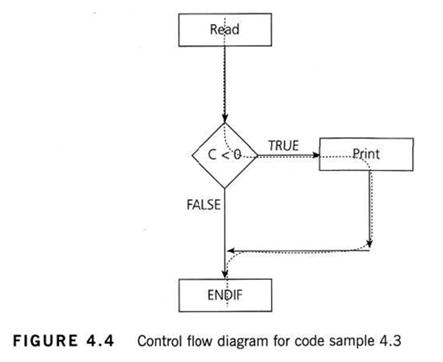
Before we answer that question, let’s have a look at another way to represent this code. Sometimes the decision structure is easier to see in a control flow diagram (see Figure 4.4).
decision coverage example
The dotted line shows where Test 2_1 has gone and clearly shows that we haven’t yet had a test that takes the False exit from the IF statement.
Let’s modify our existing test set by adding another test:
TEST SET 2
Test 2_1: A = 20, B = 15
Test 2_2: A = 10, B = 2
This now covers both of the decision outcomes, True (with Test 2_1) and False (with Test 2_2). If we were to draw the path taken by Test 2_2, it would be a straight line from the read statement down the False exit and through the ENDIF. We could also have chosen other numbers to achieve either the True or False outcomes.


Experience Based technique - based on the knowledge of testers, developers, users and other stakeholders about the software. Error guessing is the most commonly used Experience based technique.
Exploratory testing is about exploring, finding out about the software, what it does, what it doesn’t do, what works and what doesn’t work. This is an approach that is most useful when there are no or poor specifications and when time is severely limited. It is a hands-on approach in which testers are involved in minimum planning and maximum test execution.


Types of Tools used in testing (Based on the test activities that they support)

1. Tools supporting Management of testing and tests:

  • Test Management Tools: Provides interfaces for executing tests, tracking defects, managing requirements, and reporting of the test objects.
  • Requirement Management Tools: Stores the Requirement Statements, attributes for the requirements. Also support tracing of the requirements to individual tests.(Requirement traceability)
  • Incident Management Tools: Store and manage incident reports. i.e defects, failures, change requests, etc. Also supports statistical analysis of the above
  • Configuration Management Tools: Used for version management/control of the testware and related software

2. Tool support for Static Testing:

  • Review Tools: Assist with review processes, guidelines, checklists and are used to store and communicate review comments and report on defects and effort
  • Static Analysis Tools (D): Helps developers and testers to find defects before dynamic testing by providing support for enforcing coding standards, analysis of structures and dependencies. Also help in providing metrics of the code like complexity.
  • Modelling Tools (D): Used to validate software models (ex: physical data model for a relational database). These tools also help in generating some test cases based on the model.

3. Tool support for Test Specification:

  • Test Design Tools: Used to generate executable tests or test inputs from the requirements, graphical UI's, design models, or code.
  • Test Data Preparation tools: These tools manipulate the databases, files or data transmissions to set up test data to be used during the execution of the tests.

4. Tool support for Test Execution and Logging:

  • Test Execution Tools: Enables tests to be executed automatically, or semi automatically, using stored inputs and expected outcomes through the use of scripting language and provides a test log for each run. 
  • Test Harness/ Unit Test Framework Tools (D): These tools facilitate the testing of components or parts of a system by simulating the environment  in which the test object will run through the use of stubs/drivers.
  • Test Comparators: Determines the differences between files, databases or test results. They typically use dynamic comparators, but post execution comparison may be done by a separate tool.
  • Coverage Measure tools: Through intrusive or non intrusive means measure the percentage of specific types of structures (statements, branches, conditions etc) by a set of tests
  • Security Testing Tools: Used to evaluate the security characteristics of the software. 
 

5. Tools for Performance and Monitoring: 

  • Dynamic Analysis Tools (D):  Finds defects when the software is executing (like time dependencies, memory leaks
  •  Performance testing/Load testing/ Stress testing: These tools monitor and report on how a system behaves under a variety of simulations like no. of concurrent users, their ramp up pattern,  frequency and relative percentage of transactions. Uses virtual users to generate load.
  • Monitoring Tools: These tools continuously analyze, verify and report on usage of specific system resources and give warnings of possible service problems

6. Tools for specific testing needs: 

  • Data Quality Assessment: Used in data conversion/migration projects where data quality would be the main concern.


Wednesday, August 28, 2013

SDLC Models

SDLC Models are classified into 2 types:
1. Sequential Models - Waterfall Model, V Model
2. Iterative/Incremental Models - RAD(Rapid Action Development), Prototype, Agile, Spiral

  • Waterfall: a linear framework
  • Spiral: a combined linear-iterative framework with main factor as RISK
  • Incremental: a combined linear-iterative framework or V Model
  • Prototyping: an iterative framework
  • Rapid application development (RAD): an iterative framework

Waterfall Model

Description
The waterfall Model is a linear sequential flow. In which progress is seen as flowing steadily downwards (like a waterfall) through the phases of software implementation. This means that any phase in the development process begins only if the previous phase is complete. The waterfall approach does not define the process to go back to the previous phase to handle changes in requirement. The waterfall approach is the earliest approach that was used for software development.

The usage
Projects did not focus on changing requirements, for example, responses for request for proposals (RFPs)
Advantages and Disadvantages
Advantages Disadvantages
· Easy to explain to the user· Structures approach.· Stages and activities are well defined· Helps to plan and schedule the project · Verification at each stage ensures early detection of errors / misunderstanding
· Each phase has specific deliverables
· Assumes that the requirements of a system can be frozen· Very difficult to go back to any stage after it finished.· Little flexibility and adjusting scope is difficult and expensive.· Costly and required more time, in addition to detailed plan


V-Shaped Model

Description
It is an extension for waterfall model, Instead of moving down in a linear way, the process steps are bent upwards after the coding phase, to form the typical V shape. The major difference between v-shaped model and waterfall model is the early test planning in v-shaped model.

The usage
· Software requirements clearly defined and known
· Software development technologies and tools is well known
Advantages and Disadvantages
Advantages Disadvantages
· Simple and easy to use.· Each phase has specific deliverables.· Higher chance of success over the waterfall model due to the development of test plans early on during the life cycle.· Works well for where requirements are easily understood. · Very inflexible, like the waterfall model.· Little flexibility and adjusting scope is difficult and expensive.· Software is developed during the implementation phase, so no early prototypes of the software are produced.· Model doesn’t provide a clear path for problems found during testing phases. · Costly and required more time, in addition to detailed plan

Evolutionary Prototyping Model

Description
It refers to the activity of creating prototypes of software applications, for example, incomplete versions of the software program being developed. It is an activity that can occur in software development. It used to visualize some component of the software to limit the gap of misunderstanding the customer requirements by the development team. This also will reduce the iterations may occur in waterfall approach and hard to be implemented due to inflexibility of the waterfall approach. So, when the final prototype is developed, the requirement is considered to be frozen.

The usage
· This process can be used with any software developing life cycle model. While this shall be focused with systems needs more user interactions. So, the system do not have user interactions, such as, system does some calculations shall not have prototypes.
Advantages and Disadvantages
Advantages Disadvantages
· Reduced time and costs, but this can be disadvantage if the developer lose time in developing the prototypes· Improved and increased user involvement · Insufficient analysis· User confusion of prototype and finished system· Developer misunderstanding of user objectives· Excessive development time of the prototype · Expense of implementing prototyping


RAD

 RAD (rapid application development) is a concept that products can be developed
faster and of higher quality through:
• Gathering requirements using workshops or focus groups
• Prototyping and early, reiterative user testing of designs
• The re-use of software components
• A rigidly paced schedule that defers design improvements to the next product
version
• Less formality in reviews and other team communication

RAD is a methodology for compressing the analysis, design, build, and test phases
into a series of short, iterative development cycles. This has a number of distinct
advantages over the traditional sequential development model.


Spiral Model


The spiral model, also known as the spiral lifecycle model, is a systems development
method (SDM) used in information technology (IT). This model of development
combines the features of the prototyping model and the waterfall model. The spiral
model is intended for large, expensive, and complicated projects.


The basic principles are:
  • Focus is on risk assessment and on minimizing project risk by breaking a project into smaller segments and providing more ease-of-change during the development process, as well as providing the opportunity to evaluate risks and weigh consideration of project continuation throughout the life cycle.
  • "Each cycle involves a progression through the same sequence of steps, for each part of the product and for each of its levels of elaboration, from an overall concept-of-operation document down to the coding of each individual program."
  • Each trip around the spiral traverses four basic quadrants: (1) determine objectives, alternatives, and constraints of the iteration; (2) evaluate alternatives; Identify and resolve risks; (3) develop and verify deliverables from the iteration; and (4) plan the next iteration.
  • Begin each cycle with an identification of stakeholders and their win conditions, and end each cycle with review and commitment.

Agile Model

Agile software development is a group of software development methods based on iterative and incremental development, where requirements and solutions evolve through collaboration between self-organizing, cross-functional teams. It promotes adaptive planning, evolutionary development and delivery, a time-boxed iterative approach, and encourages rapid and flexible response to change. It is a conceptual framework that promotes foreseen interactions throughout the development cycle.

Difference Between Validation and Verification

Verification: Are we building the product right.
It means cross checking with the Test cases written
Validation: Are we building the right product.
It cross checks with the user requirements.


VERerification: assuring, that requirements were built right
VALidation: assuring that requirements (i.e. the system built) satify user needs 


Let us take the example of a car manufacturing which is easier to explain and understand
Imagine a car company wants to make a new car with some features and specifications. They do not manufacture all the components themselves. They sub-contract some. For example the tires. The company designs the car and gives out the specifications of various components to the subcontracting units of the same company or another company. The tire company received the specifications and made the tire. They tested the tire against the specifications they received. This is verification. The success of the verification does not mean the tire is useful. The car company once it receives the product (tire) uses the tire with the car and does the testing. This is validation. This ensures the product "The tire" is really useful.
If there is a small problem in the specifications given to the tire company, there will be problem in the final usage and the product will be useless, though legally the tire company did the right thing of making the product, as per the specification given to them. The product is made good but is not useful. It is more important to do the validation for new products as "Qualification tests" which will not only qualify the final product but also validate the specifications of the sub-components. Once qualified, then for subsequent production, a simple verification will be good enough.
Verification is a phase-wise defect containment technique. Validation will be a failure if the verification is failure, but the other way may not be true. i.e. Validation may not be successful in spite of a successful verification for a new product or development project.
Hope this can clear the doubts of any new employee